
Solcre Achieves AWS Select Tier Status in the AWS Partner Network
Solcre has officially reached a major milestone in its cloud journey: becoming an AWS Select Tier Services Partner within the Amazon Web Services (AWS) Partner Network.
A new Google app is here to help you transfer your data from an iPhone to an Android 12 phone.
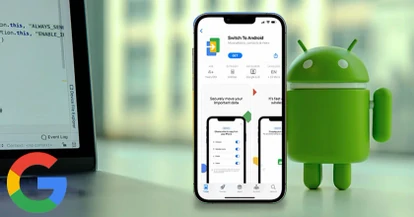
Google released this app a few months ago, introducing it as a wireless data transfer system that enables sending contact data, calendar events, photos and videos stored in an iPhone to another device running a different operating system.
Apple's Move to iOS has been available in Google Play for some time, and now Google seems to be working on Switch to Android, which will be available on the App Store to make the change from iOS to Android easier.

An important new feature is that data is transferred through Wi-Fi Direct, instead of needing to connect both devices to eachother by cable.
The second big piece of news is that Google has made changes to the app description to mention apps will be carried over as well. For technical reasons, it seems fairly unlikely that app data itself will be transferred, so it's probably something simpler like identifying what apps were installed in the iPhone and downloading them to the Android device.
Google launched this app a few months ago, presenting it as a wireless data transfer system that lets you send contacts, calendar events, photos, and videos stored on an iPhone to a device running a different operating system.
Apple's Move to iOS app has been available on Google Play for some time, and now Google appears to be working on Switch to Android, set to be available on the App Store to make moving from iOS to Android easier.
One major new feature is that data transfers over Wi-Fi Direct, instead of requiring both devices to be connected with a cable.
The second big update is that Google has revised the app description to mention that apps will also be transferred. For technical reasons, it seems fairly unlikely that the app data itself is transferred, so it is probably something simpler, such as identifying which apps were installed on the iPhone and downloading them on the Android device.
In this context, optimizing the migration process also connects to the importance of good mobile experiences, since a smooth transition has a direct impact on how users perceive their new device.
Switching smartphones can be exciting, but it also raises a common worry: what happens to the data stored on your old phone? Photos, contacts, calendars, and apps are part of your digital life, and losing them during a device change is not an option.
To solve this problem, Google launched Switch to Android, a tool that makes it easier to migrate data from an iPhone to an Android phone. The app works as a step-by-step guide and lets you copy important information from your previous device so you can start using your new phone without losing data.
For years, Apple offered its own solution with the Move to iOS app, which transfers information from Android to an iPhone. Now Google is working to balance that experience with a tool built specifically for people who decide to switch to the Android ecosystem.
Switch to Android (sometimes referred to as Android Switch) is an app developed by Google that lets you transfer data from an iPhone to Android phones simply and securely.
The app is designed to be easy to use: once it is installed on the iPhone, you follow guided steps to connect both devices and start the transfer. In many cases, the process can also be started from the new Android phone during initial setup using a QR code.
During the transfer, the app copies compatible data to the new device and makes it easier to restore information on Android through the Google Play restore tool.
For more details on the migration process and what data can be moved, Google offers an official Switch to Android guide that explains step by step how the tool works.
The main goal of Switch to Android is to simplify migration between operating systems, removing the complexity users historically faced when moving from iOS to Android.
The app can transfer:
One of its most useful features is wireless transfer over Wi-Fi Direct, which removes the need for cables. The tool can also identify the apps used on the iPhone and suggest their Android equivalents, helping you quickly rebuild your digital environment.
The Switch to Android app is Google's official tool for transferring data from an iPhone to an Android phone. Its purpose is to make moving information simple, so users do not have to move files manually.
It works by installing it on the iPhone and following the instructions to connect both devices. It also lets you start the process from the new Android phone during initial setup, copying contacts, photos, videos, and basic settings.
The Switch to Android app is mainly used to:
Switch to Android is Google's solution for anyone who wants to move from iPhone to Android without losing important data. It makes transferring contacts, photos, videos, and calendar events simple and fast, and thanks to wireless transfer it improves the user experience during the device change.
As the smartphone market grows and competition between operating systems intensifies, tools like Switch to Android become essential for giving users the freedom to change platforms without complications.
Which devices are compatible with Switch to Android? Switch to Android works on iPhones running iOS 12 or later and Android phones running Android 12 or later.
Can you transfer all apps with Switch to Android? The app identifies the apps installed on the iPhone and suggests their Android equivalents. Due to technical limitations, app data is not always transferred directly.
Do I need a cable to use Switch to Android? No. The transfer happens wirelessly over Wi-Fi Direct, avoiding cables or adapters.
Where can I download Switch to Android? You download it from the App Store for iPhone, and you can also use the Google Play restore tool as a complement.
Solcre has officially reached a major milestone in its cloud journey: becoming an AWS Select Tier Services Partner within the Amazon Web Services (AWS) Partner Network.

The version that changes how we think about and build modern frontends

The latest report from the Google Threat Intelligence Group confirms what we've suspected: artificial intelligence is no longer just a defensive tool. Now it's on the other side as well.
How can we help you take your idea to the next level?
Let’s talkContact us
Get in touch.